

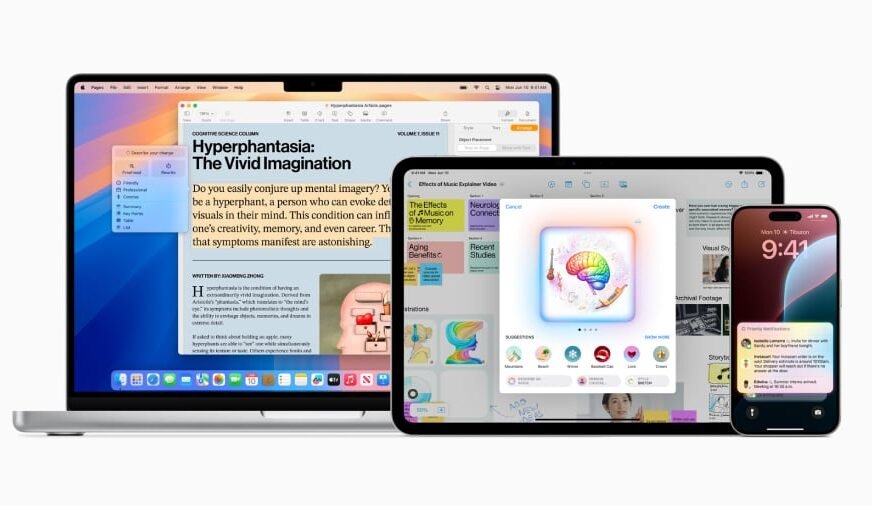
Apple Intelligence is a comprehensive suite of generative AI features designed for a range of Apple devices, including select models of iPhones, iPads, Macs, Apple Vision Pro, and Apple Watches. This innovative set of tools seeks to fulfill Siri’s original vision of becoming a more intuitive and helpful assistant. With enhancements such as on-device image generation, writing assistance, visual search capabilities, and automatic summarization, Apple Intelligence significantly enriches the Apple ecosystem, offering users a more dynamic interaction experience.
Capabilities of Apple Intelligence
Apple Intelligence encompasses a variety of generative AI functionalities tailored for use on Apple devices. Key features include:
- Generative writing tools.
- Automatic summarization.
- Smart prioritization of notifications and emails.
- Photo editing capabilities.
- Automatic sorting of photos.
- Genmoji and Image Playground for creative expression.
- Visual Intelligence for analyzing real-world objects, camera inputs, and on-screen content.
- Voice command control for device settings and actions across compatible applications.
- A more conversational and contextually aware Siri.
- Live translation of languages.
- Personalized workout recommendations.
Functionality of Apple Intelligence
Powered by Apple’s advanced chips, including neural processing units, Apple Intelligence performs many AI tasks directly on devices, ensuring personal data remains secure without needing to be transmitted to external data centers. For more intensive generative AI tasks, Apple utilizes its Private Cloud Compute system, which handles complex requests while maintaining strict privacy protocols. Apple asserts that data is utilized solely for immediate tasks and is neither stored nor shared.
Experts have the opportunity to review the code operating on Apple’s servers to verify adherence to privacy standards, reinforcing user trust in the technology.
Compatible Devices for Apple Intelligence
The Apple Intelligence suite is compatible with newer iPhones, iPads, Macs, Apple Vision Pro, and Apple Watch models, all running the requisite software. A comprehensive list of supported devices includes:
| iPhone | iPad | Mac | Other Apple Devices |
|---|---|---|---|
| iPhone 15 Pro | iPad mini with A17 Pro | MacBook Air with M1 and later | Apple Vision Pro |
| iPhone 15 Pro Max | iPad Pro with M1 and later | MacBook Pro with M1 and later | Features available on some Apple Watch models when paired with an Apple Intelligence-enabled iPhone |
| iPhone 16 and later | iPad Air with M1 and later | iMac with M1 and later | |
| Mac mini with M1 and later | |||
| Mac Studio with M1 Max and later | |||
| Mac Pro with M2 Ultra |
The availability of features may vary based on geography, language, and device specifications. Not all functionalities, particularly the latest Siri AI capabilities, might be accessible in every region at launch.
Will Older Devices Receive Apple Intelligence?
Unfortunately, older devices lacking the necessary hardware will not support the full range of Apple Intelligence features. This restriction ensures optimal performance and user experience on supported models.
Cost of Apple Intelligence
The good news for users is that Apple Intelligence is available at no additional cost, provided they update their devices to the latest software version.
Launch of Apple Intelligence
Apple Intelligence made its debut on October 28, 2024, introducing a limited feature set that included Writing Tools, Type to Siri, Clean Up in Photos, and natural language search within the Photos app. Since the initial release, Apple has continuously expanded its capabilities through updates to iOS 18 and subsequent software iterations, introducing:
- Genmoji and image tools: With these features, users can create custom emojis, generate images using the Image Playground, and transform rough sketches into polished graphics.
- Writing Tools: Users can rewrite, proofread, and summarize text, as well as provide custom commands like “turn into a poem,” applicable in Mail, Messages, Notes, Pages, and compatible third-party applications.
- Visual Intelligence: This functionality allows for identification of real-world objects or on-screen content, enabling features such as plant recognition, translation, and the creation of calendar events from invites.
- Priority Notifications: An AI system assesses Apple Mail and phone notifications, organizing them by relevance.
- ChatGPT integration: OpenAI’s chatbot can be accessed seamlessly through Writing Tools and Siri, eliminating the need for separate browser or app navigation.
- Live Translation: Messages can be translated in real-time as they are typed or received, with support for calls displaying or vocalizing translated speech.
- Workout Insights: Apple Intelligence analyzes fitness data from Apple Watch to offer personalized workout guidance.
At Apple’s 2026 Worldwide Developer Conference, the company unveiled the next evolution of Apple Intelligence and Siri AI, introducing new features that include:
- Siri AI: A revamped Siri capable of providing richer answers, engaging in more natural conversations, and supporting contextually relevant follow-ups.
- App Actions: Siri now performs tasks across supported apps, including Messages, Music, Reminders, Calendar, Mail, and Photos.
- On-Screen Visual Intelligence: Users can analyze content displayed on their screens, performing actions like searching for related products or adding events to their calendars.
- Expanded Visual Intelligence: This functionality is now available on iPad, Mac, and Vision Pro.
- Enhanced Photo Editing: New tools include Spatial Reframing, Extend, and Clean Up for enhanced editing capabilities.
- Contextual Suggestions in Messages and Mail: Apple Intelligence can recommend replies, reminders, and calendar events based on context.
- Natural Language Shortcuts: Users can articulate their needs for automation, and Shortcuts will assist in creating them.
Language support spans multiple languages, including English, French, German, Italian, Portuguese, Spanish, Japanese, Korean, Chinese Simplified, Chinese Traditional, Danish, Dutch, Norwegian, Swedish, Turkish, and Vietnamese. Certain features may have limited language support, varying by region.
Is Siri Considered Artificial Intelligence?
Definitions of artificial intelligence can vary widely. Prior to the introduction of Apple Intelligence, Siri was often regarded as a form of AI; however, it lacked generative capabilities, focusing primarily on executing predefined functions. While some may argue that these capabilities shouldn’t be classified as true AI, the term has achieved broad acceptance for various computing applications. Traditionally, it may have been more accurate to characterize older versions of Siri simply as a digital assistant.
With the advancements brought by Apple Intelligence, Siri has evolved into a more conversational, context-aware assistant. It now engages with users on a wider array of inquiries, sustains longer dialogues, leverages personal information from supported apps, interprets content from screens or cameras, and executes tasks across multiple applications. This shift enables a more accurate portrayal of Siri as an integral part of Apple’s generative AI ecosystem.
How to Enable Apple Intelligence on iPhone
Users can gain access to Apple Intelligence on supported iPhones through software updates. To verify and install the latest update, navigate to Settings > General > Software Update.
Activating Apple Intelligence
After updating to a compatible device, users should access Settings > Apple Intelligence & Siri and follow the prompts to complete the setup. For Mac users, the equivalent path is through System Settings > Apple Intelligence & Siri.
Competitors to Apple Intelligence
Samsung and Google have also integrated generative AI capabilities into their latest smartphone offerings. The Google Pixel 10 series leverages Google Gemini to enhance functionalities such as photo editing, call translation, writing assistance, visual aids, and real-time conversation features. Similarly, the Samsung Galaxy S26 series utilizes Galaxy AI alongside Google Gemini to deliver comparable features, including writing support, translation, image editing, and assistant functionalities.
For further insights on Google Gemini’s operations and its latest enhancements, check out our comprehensive cheat sheet on the subject.